
Add a training phase
Use a training phase to put a workout plan on specific dates for a client. You create it in Roadmap, not as a calendar event.
Follow these steps in coach web, including when your clients use the Kahunas iOS or Android app.
Read video transcript
Open Clients, choose your client, then open Roadmap. Select Add phase. Choose the Workout plan. Set Start date and End date, then enter a Phase name. Leave Send notification off. Check your dates, then choose Save phase when you're ready.
Open Roadmap
- Open People → Clients and choose the client.
- Select Roadmap in their profile.
- Select Add phase. On an empty roadmap, the button sits below Add a phase to start your client's roadmap.
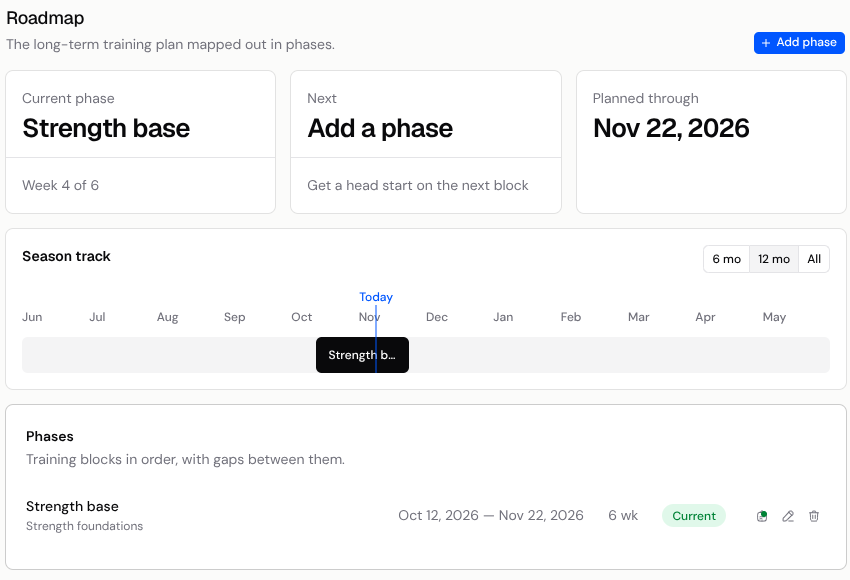
Choose the plan and dates
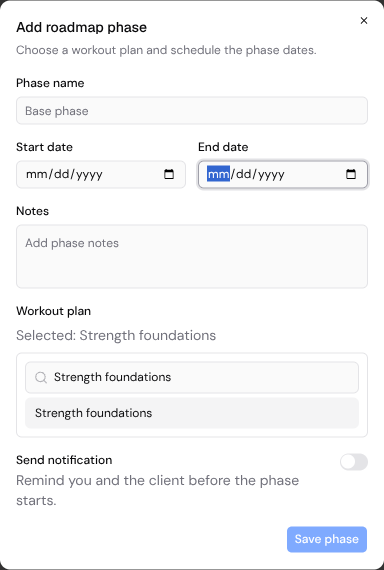
- Under Workout plan, search for the plan you want and select it. Check the Selected: line to confirm your choice.
- Set Start date and End date for the phase. Choose an end date on or after the start date, without overlapping another phase.
- Enter a Phase name, such as “Strength progression”. Add Notes if you need them.
- Leave Send notification off. Turning it on sends push and email reminders before the phase starts.
- Check the plan and dates, then select Save phase.
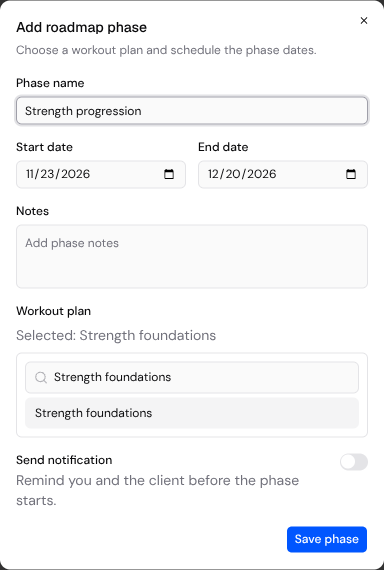
If Save phase is unavailable, check that you have selected a workout plan, entered both dates and given the phase a name. If the app reports overlapping phases, adjust the dates and try again.
Assigning a plan from Plans & Forms gives the client the plan straight away, but does not pin it to calendar dates; see Workout Programs for plan assignment.
Find the phase on Schedule
After Save phase, the phase shows on Schedule as a Training phase. Open Inbox → Schedule, go to the phase's dates and turn on the Training phase filter if it is hidden. Opening the phase shows its details.
To change the plan, dates, name or notes, return to the client's Roadmap and select Edit phase beside that phase. Save your changes there, not in the calendar event editor.
Calendar events have the types Event, Reminder and Other. You cannot attach a workout to one. Use a Roadmap training phase for a dated workout plan, and see Managing your schedule for the calendar views and filters.